Free · open source · Windows

See where your disk space went.

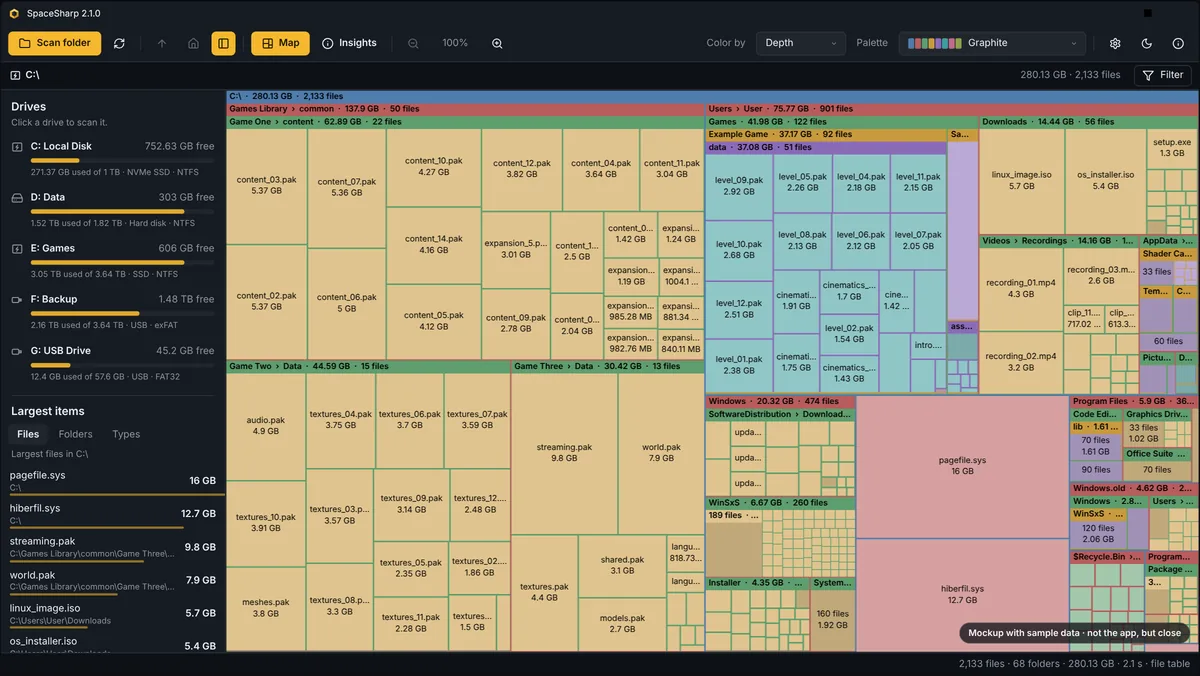
SpaceSharp turns a drive into a map you can fly into. Every file is a box sized by what it takes up, so the biggest boxes are the answer. Filter in plain words, see what is safe to clear, and send it to the Recycle Bin without leaving the map.

v2.1 · MIT · no telemetry · all downloads

Click a folder to zoom in · Backspace up · Esc whole drive
2.1 sto scan a 1 TB NTFS drive from the file table
1 exeportable build: nothing to install, nothing left behind
0 bytesof telemetry. The update check is the only network use, and it is optional
15+palettes, dark and light, plus the ones you make yourself

Try it here

Try the treemap in your browser.

A faithful mockup of SpaceSharp with sample data. Hover the boxes, open the scenes, get a feel for it before you download anything.

Mockup with sample data. Names are made up.

What it does

Built for the question "what is eating my drive?"

Scanning NTFS file table

A whole drive in seconds

SpaceSharp reads the NTFS master file table directly instead of walking folders one by one. It asks for administrator rights once, through the normal Windows prompt, and a 1 TB drive is on screen before you have found the mouse. Other file systems get a parallel folder walk.

Filter plain words

Ask in plain words

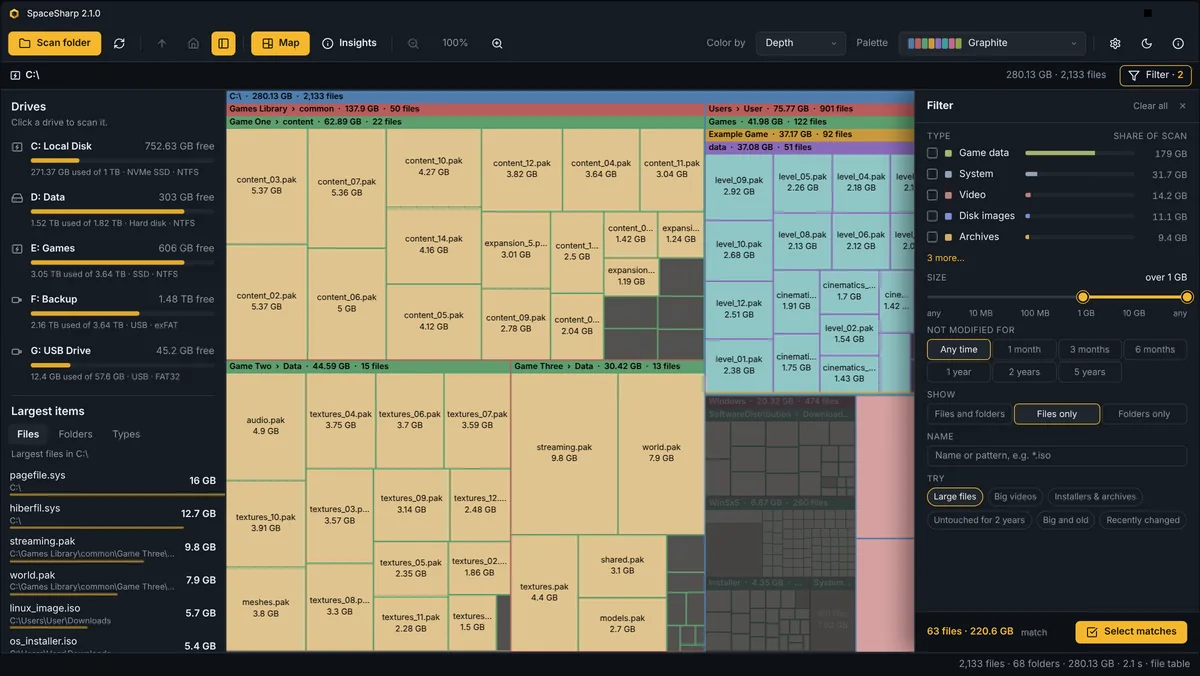
Type what you are looking for. The map keeps its layout and dims everything else, so you see where the matches are, not just that they exist. A drawer with checkboxes and sliders writes the same filter for you.

videos over 500MB older than 1 year
Safe to clear

Knows what is junk

Windows.old, caches, the Recycle Bin, old Downloads: one checkbox per row and one Recycle button.

Palettes 15 + yours

Looks the way you want

Shading, light direction, title bars and grid are sliders with a live preview. A palette creator makes new ones from a base color or by hex.

Change since last scan

Remembers every scan

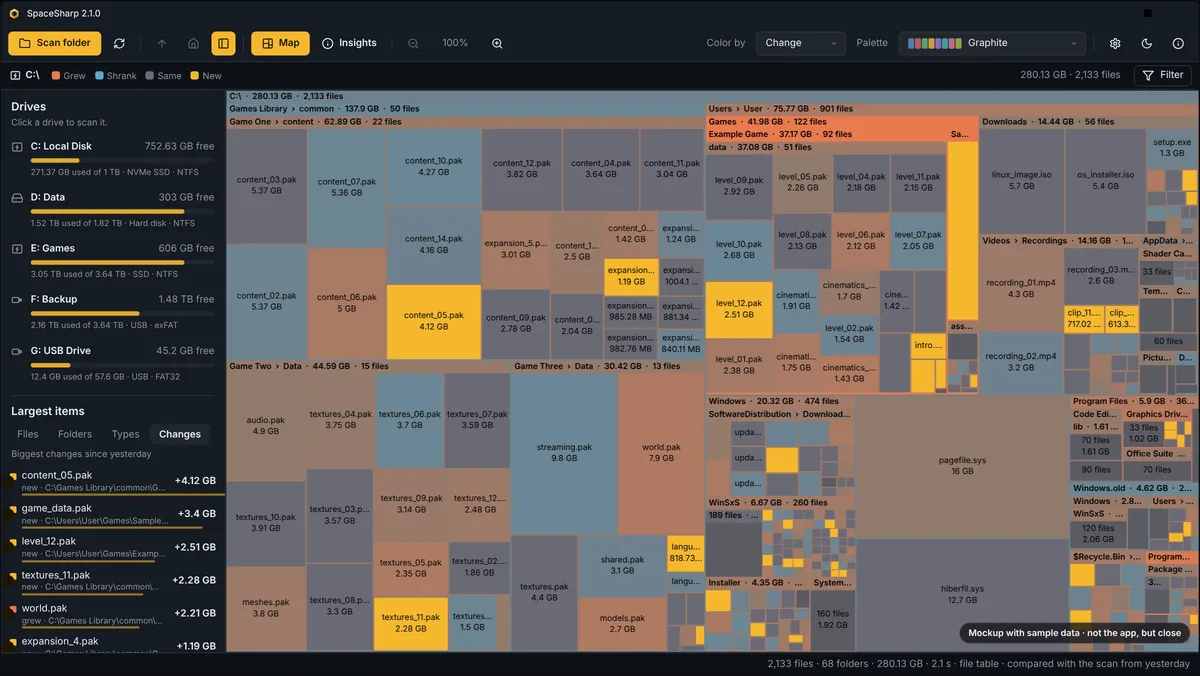
Opens with yesterday's map. Color by change shows what grew, shrank or appeared.

+4.2 GBVideos grew−1.1 GBTemp shranknewBackup.zip
Inspect

Inspect anything

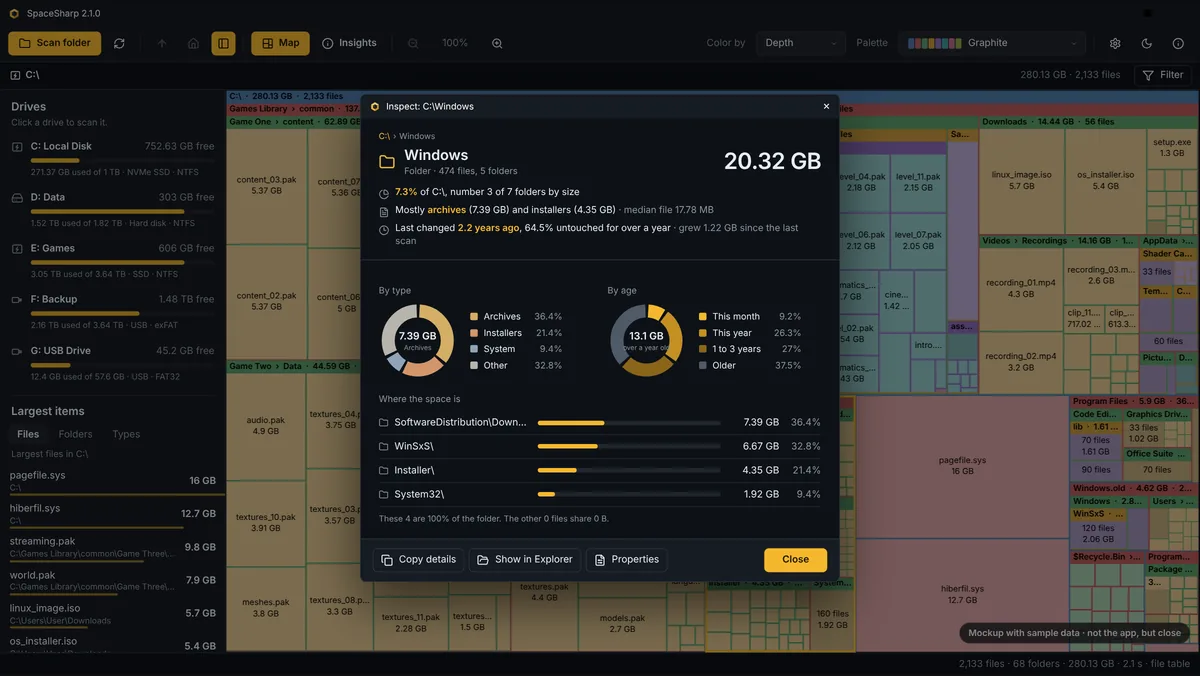
Size and share, where the space is inside, donuts by type and by age, and a callout when one thing holds most of a folder.

File types

Color by type

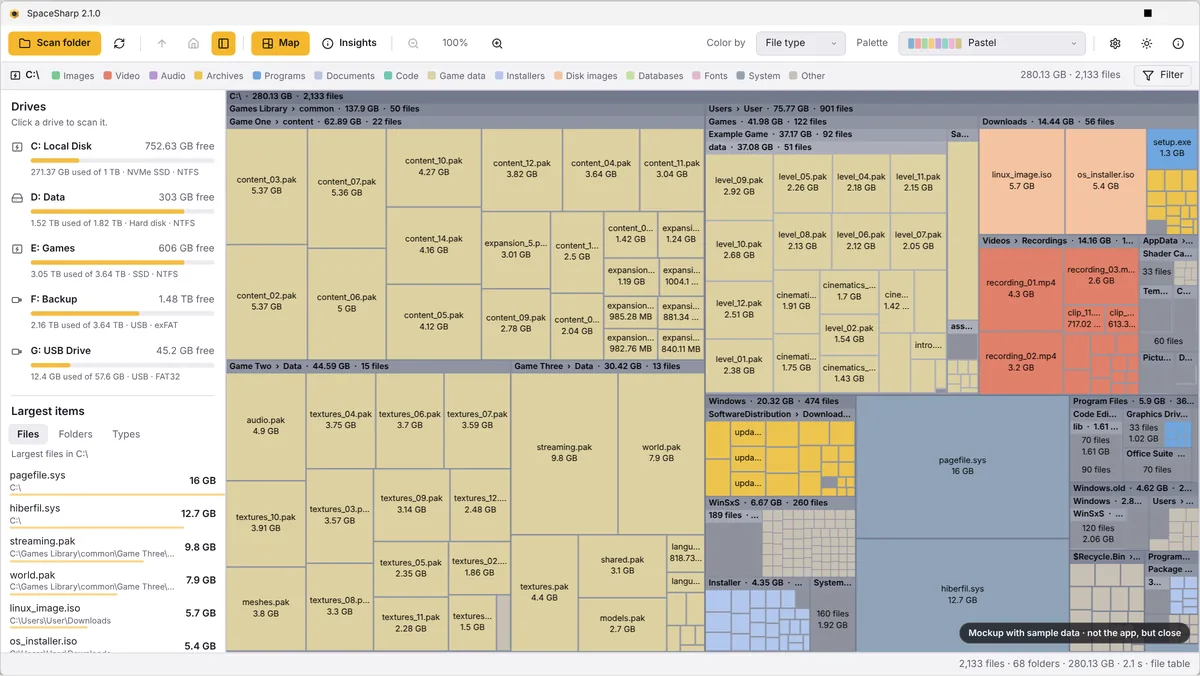
Fourteen categories with a legend, so a drive full of game assets looks different from one full of photos.

VideoGamesPhotosArchives
Cleanup Recycle Bin

Deletes safely

Everything goes to the Recycle Bin, never straight to deletion, and the map updates without a rescan.

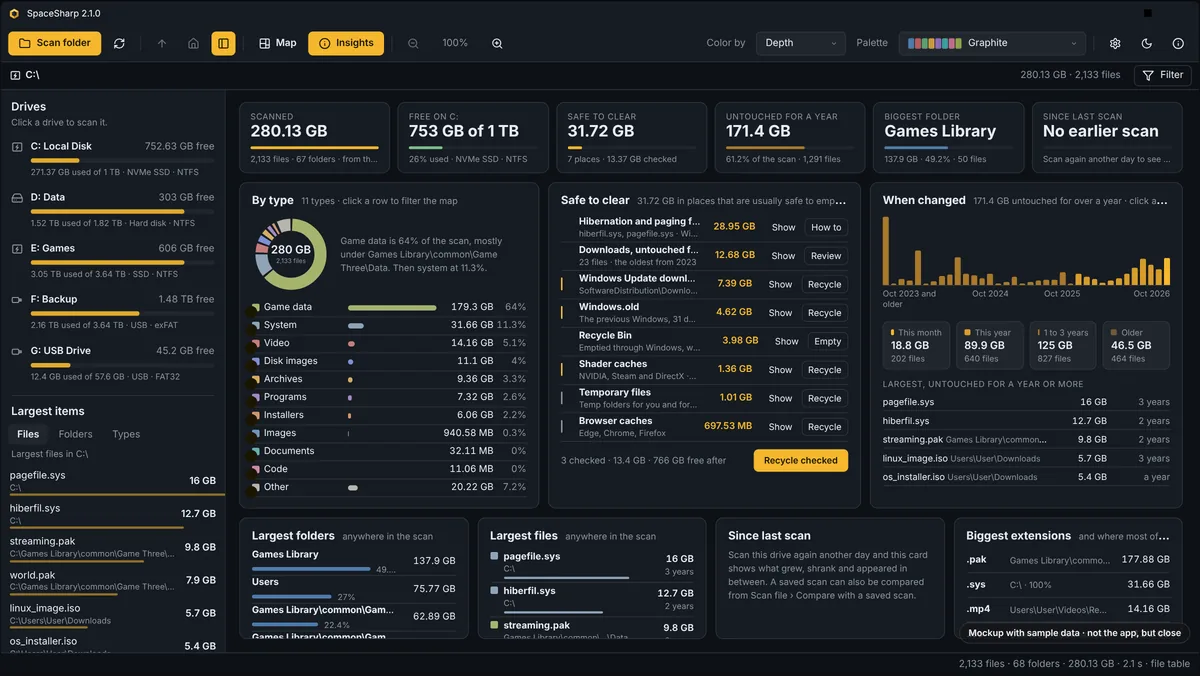
SpaceSharp Insights view: totals, space by file type, safe to clear, when files changed, largest folders and files

Insights

The numbers, when you want numbers.

One click swaps the map for cards that say what is scanned, free and safe to clear, which types take the space, how old it all is, and what changed. Every row is a click back to the map.

  • By typeVideo, games, photos, archives, code: the share of each, with its biggest extensions.
  • When changedA histogram of last-modified dates and the oldest big files, for the "I forgot that existed" moment.
  • Safe to clearPlaces that are usually fine to empty, each with a checkbox, and one Recycle button.

Compared

They all read the same disk.

The difference is what you can do once you see it.

FeatureSpaceSharpWizTreeWinDirStatSpaceMonger
Reads the NTFS file table for fast scansYes, as administratorYesNoNo
Zoomable map you fly intoYesNoNoYes
Filter in plain wordsYesName searchNoNo
Says what is safe to clearYesNoNoNo
Inspect with shares, type and age breakdownYesBasicBasicNo
Saves scans and shows what changedYesExport onlyNoNo
Dark modeYesNoNoNo
Open sourceMITNoGPLAbandoned
PriceFreeFree for home useFreeWas paid

As of October 2026, from each product's own documentation. Corrections welcome on GitHub.

In plain words

A disk space analyzer for Windows 10 and 11.

SpaceSharp is a free disk space analyzer for Windows. It scans a drive and draws it as a treemap: every folder is a frame, every file is a box, and the size of each box is the space it takes up. The biggest boxes are where your disk space went, which is the whole point. You zoom into a folder by double-clicking it, go back up with Backspace, and read the name and size of anything under the mouse.

On NTFS drives the scan reads the master file table directly, so a 1 TB disk is on screen in a couple of seconds rather than minutes. The filter takes plain words such as videos over 500MB older than 1 year and dims everything else, so you see where the matches are without losing the map. The Insights view turns the same scan into numbers: space by file type, when files were last changed, the largest folders and files, what changed since the last scan, and a list of places that are usually safe to clear, such as Windows.old, caches and the Recycle Bin, with one button to send them there.

If you have used WinDirStat, WizTree, TreeSize or SpaceMonger, SpaceSharp sits in the same family and was built in the spirit of SpaceMonger: a zoomable map you fly into, with a modern dark interface, fifteen palettes, a light theme, and cleanup that only ever goes to the Recycle Bin. It is open source under the MIT License, has no telemetry and no accounts, and comes as a portable exe, a Setup.exe that updates itself, an MSI, or, once the package clears review, winget install ClearanceClarence.SpaceSharp. It speaks English, Norwegian and Arabic.
Download

Download SpaceSharp for Windows.

For 64-bit Windows 10 and 11. Windows on ARM runs them through x64 emulation.

>winget install ClearanceClarence.SpaceSharpwinget package pending review

32-bit Windows: Setup, MSI or exe. Every release lists a SHA256SUMS.txt you can check a download against. The downloads are not code-signed yet, so SmartScreen may ask once: choose More info, then Run anyway. Release notes for every version are on GitHub Releases.

Questions

The short answers.

The README on GitHub has the long ones.

Is it safe? Does it send anything anywhere?

No telemetry, no accounts, no network use except the update check, which only asks GitHub for the latest release and only when you installed with the installer. The source is public, and SECURITY.md in the repository says exactly what the app reads, writes and deletes.

Why does the fast scan ask for administrator permission?

Reading the NTFS file table means opening the drive itself rather than its folders, and Windows only allows that for administrators. SpaceSharp asks once through the normal Windows prompt, a small elevated helper reads the table and hands the map back, and the helper exits. Say no and the normal scan runs instead.

What does "Safe to clear" actually do?

It looks at names only: Windows.old, the Recycle Bin, Temp folders, package caches, browser and shader caches, Windows Update downloads, and Downloads not touched in a year. Show selects them on the map; Recycle sends them to the Recycle Bin after the usual confirmation; Empty empties the bin through Windows; Review selects old downloads so you decide. Hibernation and paging files get a How to, never a button.

Deleting from the map, what exactly happens?

Files go to the Recycle Bin, never straight to deletion, and the map updates to show the space as free. Protected system folders are read-only unless you run as administrator, and even then the app never touches files by itself.

Why is the total different from Explorer or from the drive's properties?

The map counts file contents. Explorer's used space also includes the file system's own structures, shadow copies and space reserved by Windows. Hard-linked data such as WinSxS can be counted once here, which Explorer's folder sizes do not do.

Where do the saved scans go, and can I turn that off?

In your profile's local app data, one file per drive plus the previous one for comparison. Settings › Scanning sets how long they are kept, deletes them all in one click, and can stop the last scan from reopening at startup.

What languages does it speak?

English, Norwegian and Arabic, following Windows by default. Arabic mirrors the whole window for right-to-left reading. Translations are machine-made and read over; corrections are welcome through CONTRIBUTING.md.

What does it need to run?

Windows 10 or 11. The portable exe and the installers carry their own .NET runtime, so nothing else needs installing. The Small build on the release page is for people who already have the .NET Desktop Runtime.

More from ClearanceClarence

Also made in Norway.

Ledger tryledger.dev

The database tool phpMyAdmin should have been.

A self-hosted web tool for MySQL and MariaDB: a SQL editor with autocomplete, inline cell editing, ER diagrams, search across every table, a live process monitor, and twenty themes. Plain PHP and vanilla JavaScript, no build step, no Composer. Free and open source under the MIT License, like SpaceSharp.

Visit Ledger